Intune Administrator Is the New Domain Admin

The most dangerous role in your tenant might not be Global Admin, it's one that's assigned far too broadly... Intune Administrator.
That role gives unfettered global access to device security configuration, compliance evaluation, application and script deployment, device update behaviour, and potentially catastrophic device actions, and more.
Intune is the control plane for your entire endpoint estate.
One compromised helpdesk account with Intune Administrator could make thousands of devices bricks within minutes. Or maybe it's not even a compromised account, it's just someone with enough access bypassing the controls you have in place.
This isn’t theoretical. Endpoint management is security.
The Risks
1️⃣ It’s a Direct Path to Code Execution at Scale
By it's very nature, the Intune Administrator role can:
- Deploy PowerShell scripts
- Push Win32 applications (which could be a PowerShell script)
- Assign configuration profiles
- Modify security baselines
- Change Endpoint Security policies
That means they can execute code on every managed device in scope.
If an attacker compromises a single Intune Admin account, they don’t need lateral movement techniques, or to escalate on endpoints, and they don’t need persistence.
They can simply deploy their payload through the management plane.
That’s instant, authorised, trusted execution.
2️⃣ It Can Quietly Weaken Your Security Posture
It doesn't even have to be an attacker deploying ransomware that causes damage.
A seemingly innocuous support request could:
- Add an Attack Surface Reduction rule or Defender exclusion
- Lower device compliance requirements
- Remove disk encryption enforcement
- Add a widely exploited inbound firewall rule
- Alter Windows Update rings
Suddenly it's just a poorly-documented configuration change, not an intrusion.
Security teams often monitor endpoint alerts. Very few monitor configuration drift in Intune.
3️⃣ It Breaks Segregation of Duties (If You Let It)
In many environments:
- Support teams have Intune Administrator “because it’s easier”
- Security teams need visibility, so they’re given full rights
- Application teams need to deploy software, so they get full rights
- Projects teams get it “temporarily”… and never lose it
This creates a dangerous reality: That your most powerful endpoint security control plane is managed with convenience, not control.
Many organisations have mature processes around:
- AD Domain Admin
- Entra Global Admin
- Subscription Owner in Azure
But Intune Administrator is frequently overlooked in:
- Privileged Access Reviews
- Conditional Access high-risk enforcement
- Just-In-Time (JIT) elevation design
- Privileged Identity Management workflows
All because it’s “just device management.”
4️⃣ The Blast Radius Is Massive
With poorly scoped access, a compromised Intune Admin can near-immediately change production security controls across all devices, globally.
In a cloud-native world, that’s not just IT risk, that’s business risk.
Downtime.
Data or regulatory exposure.
Brand and reputational damage.
How many disaster recovery scenarios factor in all your endpoint devices being wiped remotely?
The Fix: Implement RBAC + Scope Tags for Least-Privilege
Microsoft Intune has powerful built-in Role-Based Access Control (RBAC) that lets you enforce least-privilege access, ensuring admins only have the permissions they actually need and only over what they should manage.
Here’s how to do it right:
Choose the right roles
Built-in roles let you grant just the permissions needed for common tasks without having to spend a ton of time. Assign roles like Help Desk Operator, Application Manager, or other task-specific roles based on job function to get a quick-win security benefit.
 Brenduns
Create Custom Roles When Necessary
If built-in roles are too broad or don’t match a specific duty, create custom roles with exactly the rights needed (no more, no less).
 Brenduns
Scope It Down With Scope Tags
RBAC tells admins what they can do. Scope Tags tell them where they can do it. Scope tags restrict which objects (policies, apps, devices) an admin can see and manage.
Oh, and Scope Tags on their own are utterly pointless - I've seen this too often, too.
 Brenduns
Assign by Security Group + Scope Group + Tags
Effective Intune RBAC assignments combine:
- Admin Group – who gets the role
- Scope Group – which users/devices they can manage
- Scope Tags – which Intune objects they can see
This prevents a Help Desk admin from seeing or managing policies or devices they shouldn’t.
Review & Revoke Regularly
Admin access should be dynamic. Regularly audit who has access. If someone no longer needs it, remove or downgrade their role.
Limit use of the high-privilege Intune Administrator for day-to-day tasks. Treat it like Global Admin or a break-glass scenario.
Also, regularly review the RBAC permissions list! Microsoft occasionally add new RBAC roles for new features. Recent examples of this would be for Endpoint Privilege Management (EPM) and Remote Help.
If new permissions are added, they'd be disabled by default for existing custom roles, but may not be if you're using the built-in roles, so keep that in mind.
Stay Up-to-Date
Nothing in IT is set-and-forget, it's constantly evolving. Keeping updated with new capabilities can further improve both security posture as well as processes. For example: Multi-Admin Approval.
 Brenduns
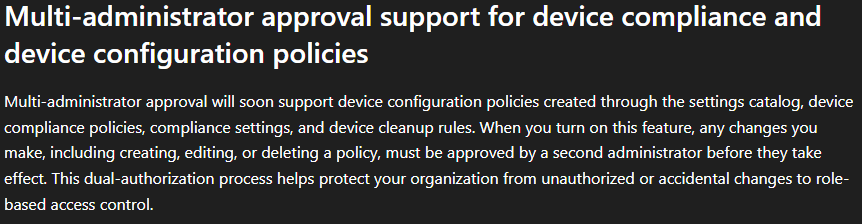
MAA adds a second admin layer, requiring approval before deploying something in Intune. Currently this is limited to things like apps, scripts and device actions, but the In Development page has just been updated to reflect that they're working on expanding this to also include device configuration and compliance policies.
The problem isn’t that the role exists, it's that organisations fail to treat Intune as:
A security-critical platform that requires the same least-privilege discipline as Identity and Infrastructure.
Implementing an effective RBAC model is hard. It takes time to analyse and architect properly as well as the human problem of creating and adopting new processes. But it should be non-negotiable.
Endpoint Management is Security.
And Security is a Team Sport.